
Pro feature. Feed delay holds newly published posts out of WordPress feed queries. It gives you time to correct a post before a feed-based newsletter or automation next fetches it. It does not delay publication on the website or prevent scraping.
Set the delay
- Open RSS Chimp → General → Options.
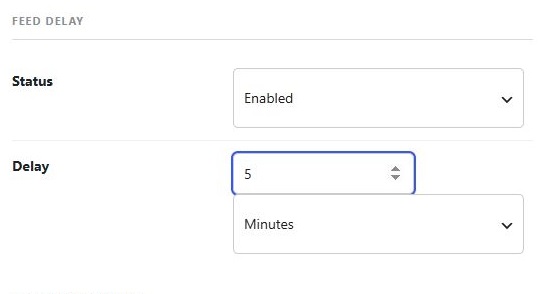
- Find Feed delay and set Status to Enabled.
- Enter a non-negative delay value and select its unit.
- Click Save Changes.
Important timing behavior in 1.3.1
The current 1.3.1 implementation includes an extra complete unit for seconds, minutes, hours, days and weeks. For example, a value of 5 minutes admits posts from about 6 minutes old, and 1 hour from about 2 hours old. A value of zero still includes one unit while the feature is on. Select a smaller unit if you need finer timing.
Verify with a test post
Test on staging with a newly published post and record its publication time. Check the raw feed at intervals, then check your receiving service. Website caches, the plugin’s short-lived feed cache and the service’s polling schedule can all add time. The setting cannot guarantee that an email is sent at an exact minute.
Disable the delay
Set the status to Disabled and save. Check the raw response again after clearing any website/CDN cache. If posts remain missing, also check their publication status and WordPress’s feed entry limit.