
RSS Chimp lets you add copyright, managing editor, and webmaster information to your RSS channel. These fields follow the RSS 2.0 specification and are read by feed readers, aggregators, and content tools that index your feed.
How to add channel metadata
- Go to RSS Chimp → Settings → General → Options
- Fill in any of the three fields below. Only fields you actually fill in are included in the feed output.
- Save settings.
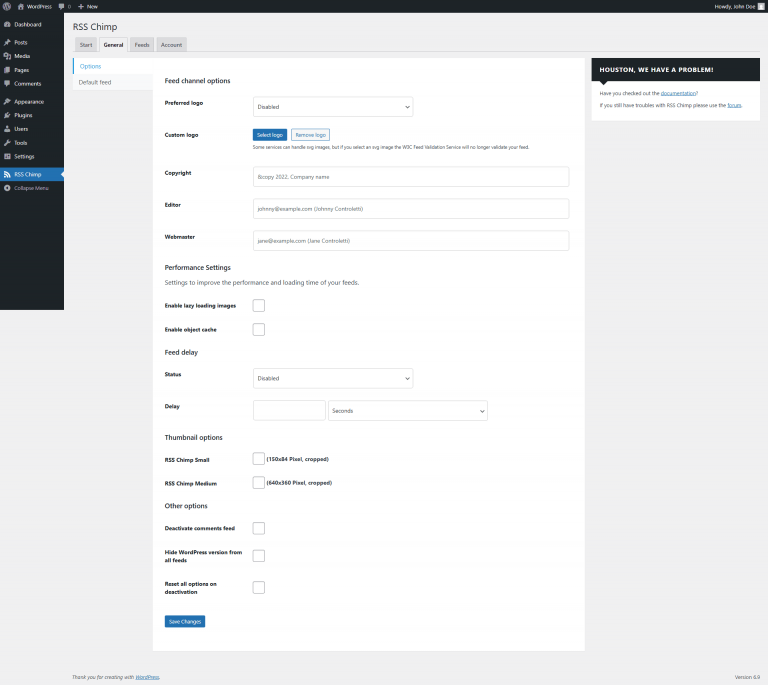
Go to RSS Chimp → Settings → General → Options
You’ll find three optional fields you can fill in. Only the fields you actually fill in will be included in your RSS feed.
Available Fields
Copyright
Adds a <copyright> tag to your feed channel.
Example value: © 2026 Your Name. All rights reserved.
Output in feed:
<copyright>© 2026 Your Name. All rights reserved.</copyright>
Use plain text only. Avoid emoji or HTML — some feed readers won’t display them correctly.
Managing Editor
Adds a <managingEditor> tag with the contact for editorial content.
Format: [email protected] (Your Name)
Example value: [email protected] (Jane Smith)
Output in feed:
<managingEditor>[email protected] (Jane Smith)</managingEditor>
The email address comes first, followed by the name in parentheses. This is the order defined by the RSS 2.0 spec.
Webmaster
Adds a <webMaster> tag with the technical contact for the feed.
Format: [email protected] (Your Name)
Example value: [email protected] (Jane Smith)
Output in feed:
<webMaster>[email protected] (Jane Smith)</webMaster>
Can be the same address as Managing Editor. Leave blank if you don’t need a separate technical contact.
Troubleshooting
Fields not appearing in the feed
- Make sure you saved the settings after entering values.
- Open your raw feed URL (e.g.
https://yourdomain.com/feed) and check the XML directly. The metadata fields appear inside the<channel>element, near the top. - Some feed readers hide channel-level metadata in their UI. Viewing the raw feed is the most reliable way to confirm the tags are present.
Special characters look wrong
RSS expects plain text. Avoid emoji, HTML entities, or unusual symbols. They may render incorrectly in some feed readers and validators.