
Pro feature. Add a short message before or after post content in the default feed or a particular custom feed. Useful examples include a sponsor disclosure, a link to the original website or a newsletter call to action.
Choose the right feed
- For the default feed, open RSS Chimp → General → Default feed. For a custom feed, open the appropriate row under Feeds.
- Enter markup in Custom HTML before each RSS item and/or Custom HTML after each RSS item.
- Keep the message short and use supported basic HTML.
- Click Save Changes and preview the raw feed and receiving service.
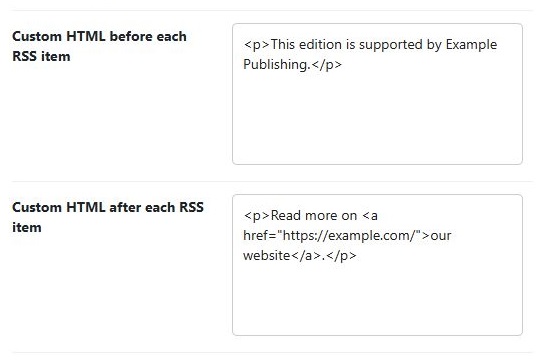
Example
<p>Read more on <a href="https://example.com/">our website</a>.</p>Use an absolute HTTPS link and meaningful link text. The plugin sanitizes the submitted markup; scripts, unsafe attributes and unsupported elements may be removed. It does not execute PHP or JavaScript supplied in these fields.
Where the message appears
The message is part of the feed item’s content, rather than a new XML item or channel element. A custom feed’s excerpt/full-content choice affects its output. A newsletter template that ignores the content field may not show your message. Custom-feed settings are separate from the default-feed fields.
Check compatibility
A feed reader or newsletter service can strip styling, links or other HTML. Prefer paragraphs, emphasis and ordinary links over complex layouts. Do not insert CDATA wrappers or feed XML into these HTML fields.
Remove a message
Clear the corresponding field and save. Clear website/CDN caches as needed and refresh the service preview. Do not use a reset of all settings just to remove one message.