
WordPress and many feed readers cache RSS feeds aggressively. As a result, newly published posts can appear in your RSS feed almost instantly – sometimes before caching plugins, SEO tools, or automation workflows have fully processed them. To give your site a safety buffer, RSS Chimp Pro includes a feed delay feature.
With feed delay enabled, new posts are held back for a defined period (for example, 5–60 minutes) before they appear in your RSS feed. This brings several advantages:
- It gives you time to correct typos, misspellings, and last-minute content edits.
- It helps avoid issues like incomplete metadata, missing images, or layout glitches that might occur right after publishing.
- It protects you from accidentally published or unfinished posts being immediately distributed.
This is especially useful if you use marketing automations based on your RSS feed – for example, via Zapier – to automatically post to social media or send newsletters when a new article is published. If you configure a feed delay of one hour, your automations will only be triggered after that hour has passed. That means you have a full hour to undo a mistaken publication or fix content issues before your subscribers, followers, and tools see the post.
You can easily configure or disable the feed delay in the plugin settings.
How to set or disable feed delay?
Steps to change the feed delay:
- Go to RSS Chimp → Settings → General → Options
- Enable the checkbox and choose your desired delay time (e.g., 5, 10, 20, or 60 minutes)
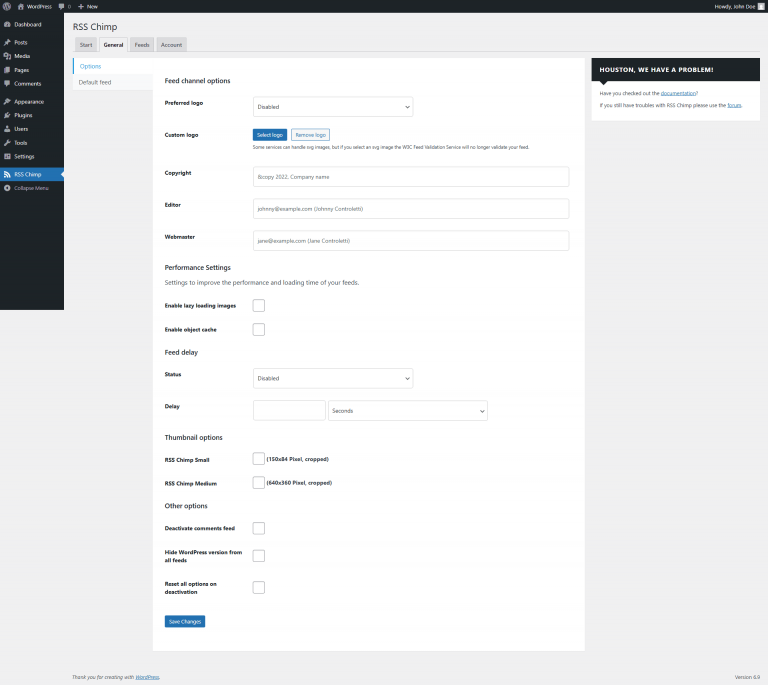
Go to RSS Chimp → Settings → General → Options
Enable the checkbox and choose your desired delay time (e.g., 5, 10, 20, or 60 minutes)