
If you ever feel like you’d like to start over with RSS Chimp, you can reset the plugin and remove all of its settings with just a few steps. This is especially helpful if you’ve tried many different configurations, changed your setup repeatedly, or simply want to return to a clean default state.
To begin, open the RSS Chimp settings page in your WordPress dashboard and switch to the General tab. Scroll down to the very bottom until you find the option “Reset all options on deactivation”. Enable this checkbox and click Save to confirm. Activating this option tells RSS Chimp to automatically delete all of its settings the next time the plugin is deactivated.
After saving, navigate to the Plugins section in your WordPress backend and deactivate RSS Chimp (or RSS Chimp Pro). The moment the plugin is deactivated, all configuration options and stored settings are removed from your site. When you reactivate the plugin, RSS Chimp will behave exactly as if it has just been installed, with all settings restored to their defaults.
How to reset all settings in RSS Chimp?
- Go to RSS Chimp → Settings → General → Options
- Enable “Reset all options on deactivation” and click “Save”
- Go to “Plugins” and deactivate RSS Chimp or RSS Chimp Pro
- Reactivate the plugin to start fresh with default settings
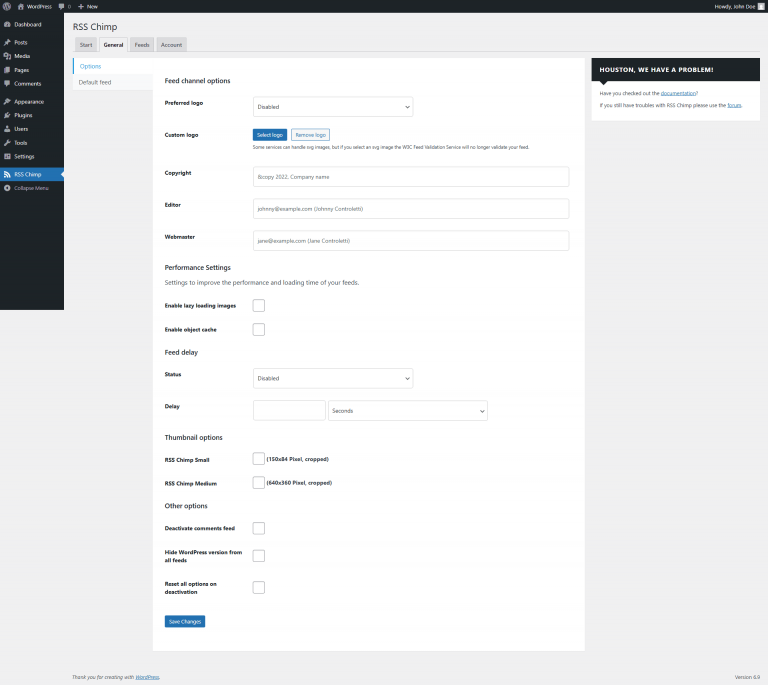
Go to RSS Chimp → Settings → General → Options
Enable "Reset all options on deactivation" and click "Save"
Go to "Plugins" and deactivate RSS Chimp or RSS Chimp Pro