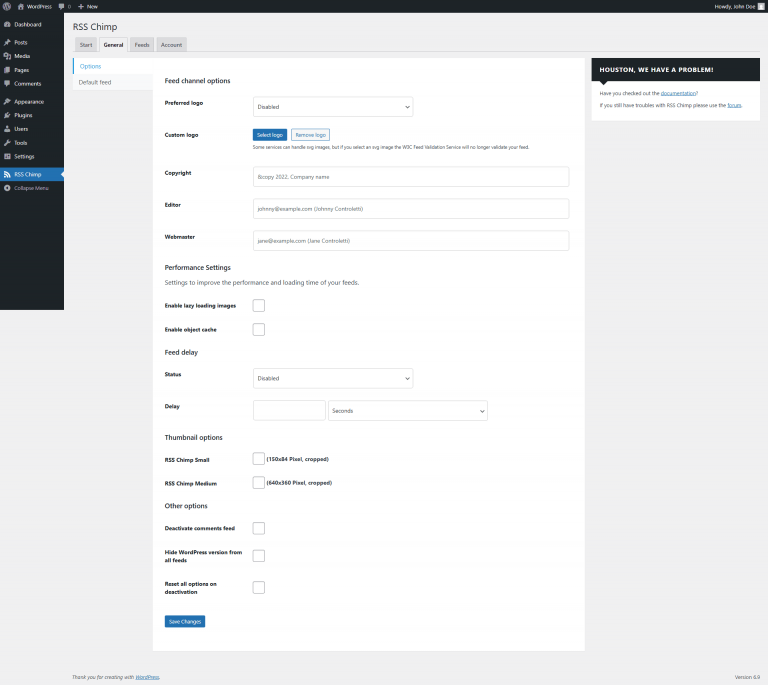
Go to RSS Chimp → Settings → General → Options
Enable "Deactivate comments feed" and click "Save"

WordPress automatically generates a global comments feed that includes all comments posted across your entire site. While this can be useful in some cases, many site owners do not need or want this feed to be publicly accessible. It can create unnecessary clutter, reveal information you prefer to keep private, or simply confuse users who expect to see content posts rather than comments in their feed reader.
With RSS Chimp Pro, you can easily disable this default WordPress comments feed. This prevents WordPress from exposing the /comments/feed/ URL and ensures that only the feeds you actually want to offer—such as your main content feed or custom feeds—remain active.
To disable the default comments feed, go to the RSS Chimp Pro settings in your WordPress backend, open the General tab, and look for the section Other options. There you will find a setting that allows you to turn off the global WordPress comments feed. Simply tick the checkbox and save your changes.
Steps to deactivate the global comments feed added by WordPress:
Go to RSS Chimp → Settings → General → Options
Enable "Deactivate comments feed" and click "Save"