
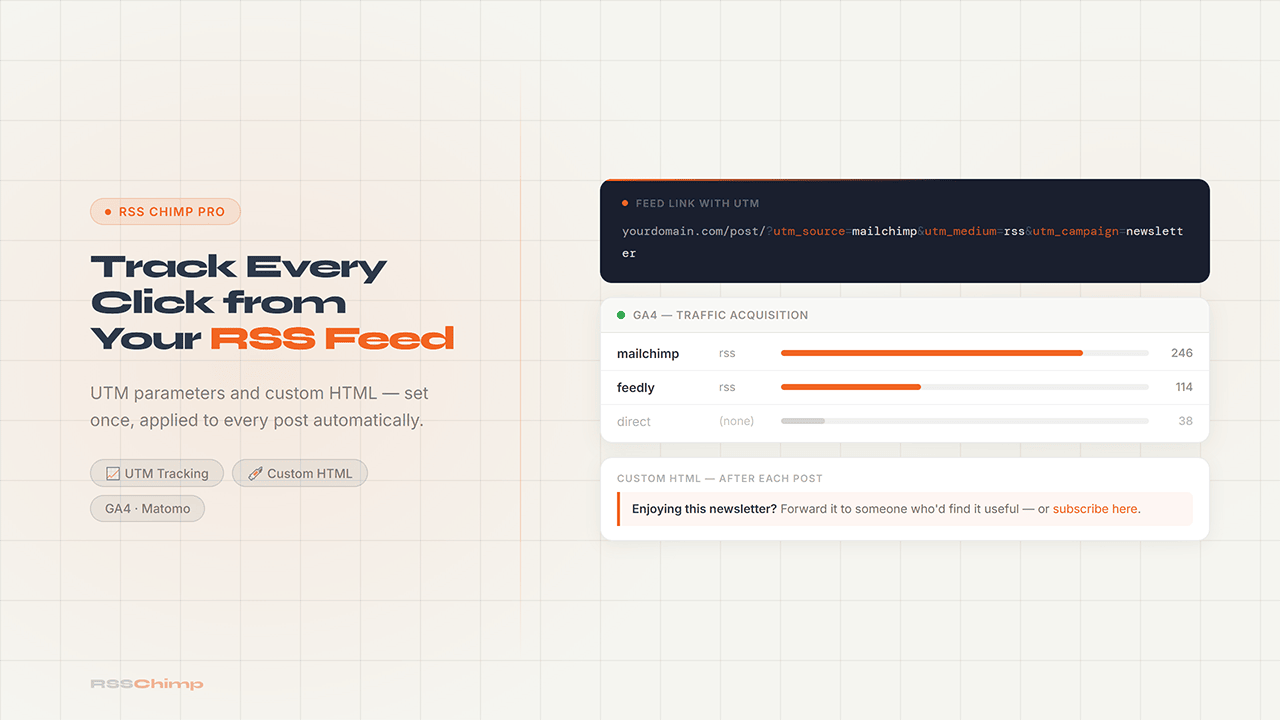
Adding UTM parameters to your WordPress RSS feed is one of those things that takes five minutes and pays off every week. Right now, every click from your RSS-to-email campaign shows up as direct traffic in Google Analytics. No source, no medium, no campaign. UTM parameters fix that. Set them once in your RSS feed settings and every link in every future email gets tagged automatically.
Why RSS Clicks Show Up as Direct Traffic
When Mailchimp, Kit, or any other email platform sends your RSS feed as a newsletter, the links in that email point directly to your posts. There’s no redirect through the email platform’s click tracker unless you’ve specifically configured one. And even when platforms do track clicks internally, that data lives inside the platform, not in your own analytics.
The result: your GA4 shows a spike of “direct” traffic on newsletter send days. You know the traffic came from the email. GA4 doesn’t.
UTM parameters are query strings you append to URLs that tell analytics tools exactly where traffic came from. A link like https://yourdomain.com/post/?utm_source=mailchimp&utm_medium=rss&utm_campaign=newsletter arrives in GA4 fully labeled. You know the source, the medium, and the campaign without any guesswork.
What UTM Parameters to Use for RSS Feeds
There are five standard UTM parameters. For an RSS feed, three of them matter:
utm_source identifies where the traffic comes from. Use the platform name: mailchimp, kit, brevo, feedly, or whatever you’re sending from.
utm_medium identifies the channel type. Use rss or email depending on how you think about it. rss is more precise because it distinguishes automated RSS campaigns from manually written emails.
utm_campaign identifies the specific campaign. Something like newsletter, rss-feed, or a more specific name if you run multiple campaigns.
A complete tag for a Mailchimp RSS campaign might look like:
?utm_source=mailchimp&utm_medium=rss&utm_campaign=newsletterKeep it consistent. If you use mailchimp as the source in one feed and Mailchimp in another, GA4 treats them as separate sources.
Custom HTML: Putting Something in Every Post
UTM parameters track where readers go. Custom HTML controls what they see when they get to each post in the feed.
The Custom HTML injection feature in RSS Chimp Pro lets you insert any HTML before or after each post entry in the feed. Whatever you put there shows up in every automated email, every feed reader item, every aggregator that pulls from the feed.
Practical uses:
Sponsor messages. A short line at the end of each post, every week, without touching any individual post. Write it once in the feed settings and it goes everywhere automatically.
CTAs. Something like “Enjoying this newsletter? Forward it to someone.” Or a link to your most recent product. Or a reminder about your consulting services. You don’t have to remember to add it to each post. it’s always there.
Feed reader prompts. If a significant part of your audience reads in Feedly or Inoreader rather than via email, you can add a subscribe prompt at the end of every item. They’re already subscribed to the feed, but they might not be on your email list.
The HTML needs to be inline-styled for email compatibility. External stylesheets don’t work in most email clients, so keep it simple. a paragraph, a link, a short bordered block. Test whatever you write in your actual email platform before setting it as a permanent fixture.
How to Set Both Up in RSS Chimp Pro
Both UTM parameters and Custom HTML injection are available in RSS Chimp Pro under RSS Chimp → Settings → Default Feed and per custom feed.
For UTM parameters, enter each parameter value in the URL Parameters fields. RSS Chimp appends them to every post link in the feed automatically. you don’t need to tag individual posts.
For Custom HTML, paste your HTML into the Before Content or After Content fields. Before Content places it above the post body in the feed item. After Content places it below. Most use cases want After Content.
Both settings apply to your default feed and all custom feeds independently, which means your Mailchimp feed can carry Mailchimp-specific UTM parameters while a separate feed for Feedly carries different ones.
Start a free 14-day Pro trial. no credit card required.
FAQ
Why do RSS feed clicks show as direct traffic in GA4?
Because the links in your RSS feed point directly to your posts with no analytics middleware. Unless you tag the URLs with UTM parameters, GA4 has no way to know the click came from an email or feed reader.
What UTM parameters should I use for an RSS feed?
At minimum, set utm_source to the platform name (e.g. mailchimp), utm_medium to rss or email, and utm_campaign to something that identifies the newsletter. Keep the values consistent — GA4 is case-sensitive.
Do UTM parameters affect how links work for subscribers?
No. The link still goes to the same post. UTM parameters are ignored by browsers and only read by analytics tools. Subscribers don’t see them unless they look at the URL after clicking.
Can I add UTM parameters to RSS feeds without a plugin?
Not easily. You’d need to hook into WordPress’s feed output and modify every link programmatically. RSS Chimp Pro handles this from the plugin settings without any code.
What is Custom HTML injection in an RSS feed?
It lets you insert HTML before or after each post entry in the feed. The content appears in every automated email, feed reader item, or aggregator that pulls from the feed — without touching individual posts. Common uses are sponsor messages, CTAs, and subscribe prompts.
Does custom HTML work in email clients?
It works if you use inline styles. Email clients strip external CSS, so anything that relies on a stylesheet won’t render correctly. Keep the HTML simple: short paragraphs, inline-styled links, basic borders. Test in your actual email platform before making it permanent.
Are UTM parameters and Custom HTML free or Pro features in RSS Chimp?
Both are Pro features. The free version of RSS Chimp doesn’t include URL parameter tracking or Custom HTML injection. Both are available from the first day of the 14-day free trial.
Does RSS Chimp add UTM parameters to all feeds or just the default feed?
Both. You can set UTM parameters on your default feed and independently on each custom feed. A Mailchimp feed can carry Mailchimp-specific parameters; a Feedly feed can carry different ones.